A sourcing trip can leave you with hundreds of photos and a long list of items to sell. Bulk eBay listing helps you turn those photos into detailed listings faster, with less time spent researching products and filling in fields.
In Orvillist, upload your photos, group them into listing drafts, and generate the listing details with AI. Review and edit the results, then publish your ready listings to eBay together. You choose what goes live.
1. Photograph your items and upload the batch
For clothing, include a clear front and back, brand and size labels, care or material labels, measurements, and close-ups of wear or damage. Keep each item’s photos together so selecting a set is straightforward.
The photos are evidence for the draft. A label can establish a tagged size; a ruler photo can show a measurement. Photograph stains and other flaws too, so the condition description has something concrete to work from.
Watch a batch of product photos arrive in the photo library, ready to group into listing drafts.
2. Select each item’s photos and create a draft
Upload the batch to the photo library. Select the photos for one product and choose Create draft. Those photos move out of the library into that listing, leaving the rest ready for your next selection. On desktop, Shift-click can select a range.
Choose your starting SKU when creating a draft. Orvillist keeps numbering new drafts automatically, including future uploads, until you change it. Work through the remaining photo groups to create the rest of your drafts.
Watch product photos become ten listing drafts, with SKUs incrementing automatically.
3. Generate the listing details in bulk
Select your drafts and choose Generate with AI. Orvillist identifies and researches the items from their photos, then prepares titles, descriptions, categories, condition details, item specifics, and asking-price recommendations.
Watch those ten drafts fill in with listing details, ready to review and publish.
What one of those listings contains
This Camp David jacket is the first item in the walkthrough. Here is a selection of its saved listing details.
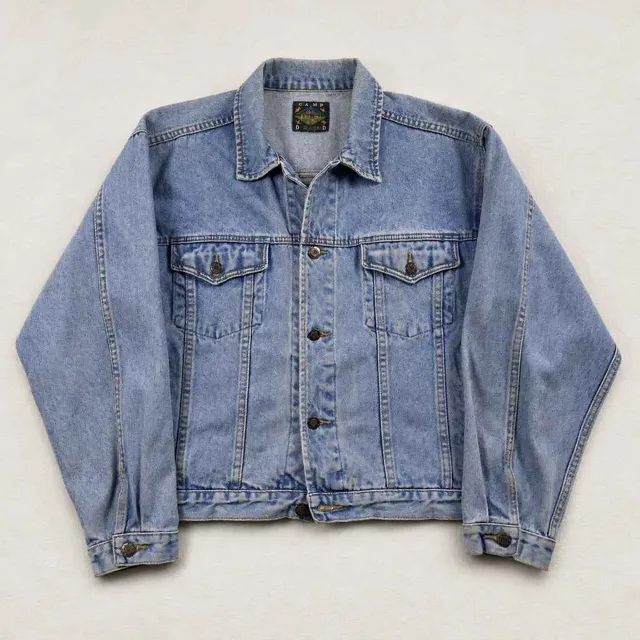
Listing title
Vtg 90s Camp David Denim Trucker Jacket Mens M Light Blue Cotton Button Front
$34.90
25 of 38 item specifics
- Category
- Clothing, Shoes & Accessories > Men > Men's Clothing > Coats, Jackets & Vests
- Brand
- Camp David
- Size
- M
- Size type
- Regular
- Outer shell material
- Cotton
- Color
- Blue
- Chest (pit to pit)
- 23″
- Length
- 24″
- Sleeve length
- 22.5″
- Condition description
- Pre-owned with faded denim and visible yellow-brown stains on one sleeve and scattered areas of the back, including near the yoke and lower hem.
From an actual Orvillist listing.
4. Check the details, then publish your ready listings
Open a draft when you want to inspect its title, description, category, and item specifics. Check measurements and condition against the item, then confirm the price and your shipping, payment, and return policies. You can edit the listing before it goes live.
When a batch is ready, filter Listings by Draft, select the ready items, and choose Publish. Listings show their publishing state and become Published as they finish. Generating with AI does not publish them automatically.
Watch nine ready drafts publish to eBay. As they finish, the Draft view empties; clearing the filter reveals the published listings.
Is photo-based bulk listing right for your inventory?
This approach suits sellers with changing inventories of clothing, vintage finds, and collectibles. Prepare batches from the photos you already take, then spend your time checking details and getting listings live.
If you already have structured product data, read our comparison of spreadsheet and photo-based bulk upload. For a broader look at Orvillist, see its features.