eBay item specifics are the structured details in a listing: brand, size, material, model, color, and other attributes that depend on the category. Fill in the required fields first, then the relevant recommended and additional details you can verify. Accurate details help buyers narrow their search and decide whether your item is right for them.
For resellers, this is often the slow part of listing. Every thrifted jacket or estate-sale find can need different research. Knowing what to look for—and when to leave something unanswered—helps you get through that work with fewer mistakes.
Why item specifics matter on eBay
Imagine a buyer searching for a green men’s polo in large. Your title might contain all those words, but buyers can also narrow results using size, color, brand, and other filters. Those filters rely on the corresponding item specifics.
In its item specifics guidance, eBay explains that a listing needs matching specifics to appear in filtered results. Putting “large” in the description does not replace choosing the correct size in the size field.
Accurate specifics help buyers find and understand your item. They do not guarantee a particular search position or a sale. Demand, price, photos, condition, and the rest of the listing still matter.
Required, recommended, and additional: where to start
- Required
- Complete these to create or revise the listing. Check the actual category’s requirements rather than copying another seller’s fields.
- Required soon
- eBay flags fields that will become mandatory. Check the date shown in Seller Hub and address them before the change.
- Recommended
- Prioritize relevant details you can support. eBay bases its recommendations on buyer demand and popular searches.
- Additional
- Add useful facts that help someone decide whether the item is right for them. Not every available field applies to every item.
The fields vary by category and can change. Choose the correct category before spending time completing them. A shirt listed in the wrong category can leave you answering the wrong questions.
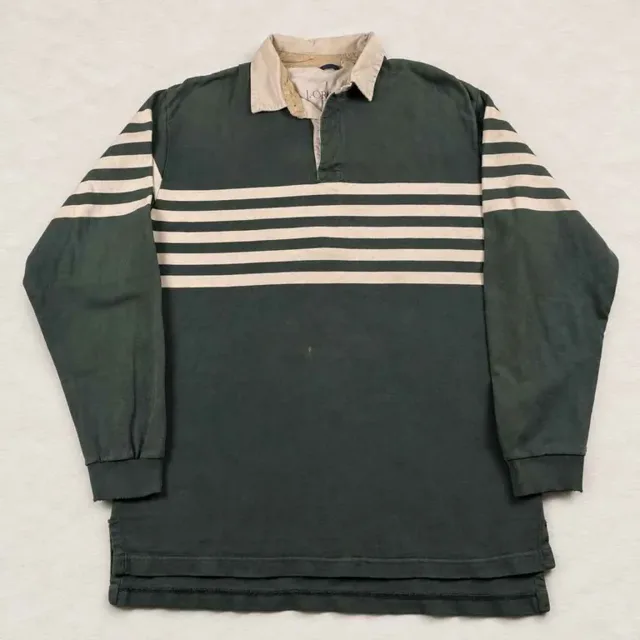
A real example: J.Crew rugby shirt
From an actual Orvillist listing.
- Brand
- J.CREW
- Color
- Green
- Department
- Men
- Size Type
- Regular
- Size
- L
- Type
- Polo
- Sleeve Length
- Long Sleeve
- Pattern
- Striped
- Fit
- Regular
- Material
- 100% Cotton
- Fabric Type
- Jersey
- Style
- Casual
- Features
- Contrasting Trim · Extra Buttons · Ribbed-Knit Cuffs · Side Vents
- Neckline
- Collared
- Closure
- Button
- Collar Style
- Spread
- Country of Origin
- Taiwan
- Vintage
- Yes
- Theme
- Classic · Preppy
- Garment Care
- Machine Washable
These are selected item specifics from the saved listing. Material and fabric type answer different questions: 100% Cotton describes the fiber content, while Jersey describes the fabric. Fit, collar style, cuffs, and side vents give buyers more to work with than a brand and size alone.
Aim for useful coverage, not guesses
Required fields are the starting point. Relevant recommended and additional specifics can describe much more of what a buyer wants to know: fit, fabric, features, pattern, product line, and other details that vary by category.
Complete the fields you can support with the item, its labels, measurements, or reliable research. Leave an optional field unanswered when it does not apply or cannot be established. A high fill rate is valuable when the answers describe the actual item.
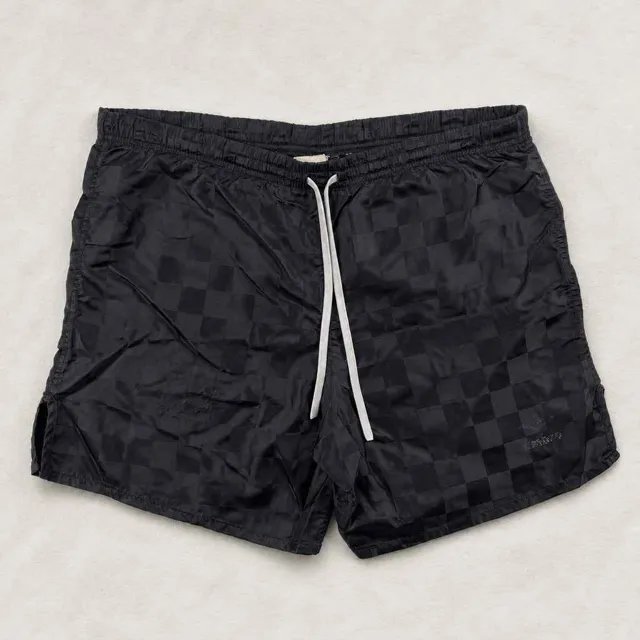
Another example: Umbro soccer shorts
From an actual Orvillist listing.
- Brand
- Umbro
- Color
- Black
- Department
- Men
- Size Type
- Regular
- Size
- S
- Style
- Athletic
- Performance/Activity
- Soccer
- Country of Origin
- United States
- Inseam
- 6 in
- Waist Size
- 36 in
- Material
- 100% Nylon
- Fabric Type
- Jacquard
- Fit
- Athletic
- Pattern
- Check
- Features
- Drawstring · Elastic Waist · Back Pocket · Side Vents · Lightweight
- Closure
- Drawstring
- Theme
- Sports
- Occasion
- Activewear · Casual
- Vintage
- Yes
- Garment Care
- Machine Washable
These selected fields show how the details change with the item. Inseam, waist size, drawstring closure, and soccer activity help describe these shorts. The rugby shirt instead has sleeve length, neckline, and collar style.
Notice that Size S and Waist Size 36 in are both saved here. The tagged size and the measured waistband are different kinds of information. The description should explain that distinction so a buyer can compare the measurements with shorts they own.
What if you do not know an item specific?
Start with the evidence you have: labels, model numbers, care tags, packaging, and measurements. Research an exact identifier where possible. Similar listings can suggest what to check, but another seller’s answer is not proof about your item.
- Optional and unknown: leave it blank rather than invent an answer.
- Required and unknown: inspect or research further, and use only a truthful option the category permits. Do not choose an unrelated value just to publish.
- Not applicable: use an appropriate not-applicable choice only when it genuinely applies and eBay allows it. Unknown and not applicable are different.
Product identifiers such as UPCs and manufacturer part numbers need the same care. Never borrow one from a similar-looking item. See eBay’s product identifier guidance for those fields.
Do description keywords replace item specifics?
No. Use the title to identify the product, item specifics for structured attributes, and the description for measurements, flaws, included parts, and useful context. Keep them consistent instead of stuffing the same keywords into every available field.
Condition also needs its own attention. The rugby shirt’s saved condition is “Pre-owned - Fair.” Its brand, pattern, and material do not explain its wear. Show any flaws in clear photos and describe them in the condition details.
Our guide to writing eBay titles shows how to use verified details in the title without padding it with unrelated terms.
How to fix missing item specifics on existing listings
In Seller Hub, check the tasks and active-listing filters for missing required, required-soon, or recommended specifics. eBay also provides tools to work through multiple listings and a download/upload option for eligible updates.
Review each item’s values before applying a bulk change. Several jackets can share a category while having different sizes, materials, and closures. Bulk editing saves repeated work; it does not make one answer correct for every item.
A quick item specifics checklist
- Choose the category that accurately describes the item.
- Complete required fields and check any upcoming requirements.
- Add relevant recommended details supported by labels, inspection, or reliable research.
- Check size, material, model, and other details against the title and description.
- Remove inherited guesses, unrelated themes, and unsupported claims before publishing.
Be especially careful with Sell Similar. Use it as a starting point, then review every copied value against your own item. A convincing title can still sit above the wrong size, fabric, or model.
Spend less time filling out your eBay listings
Orvillist uses product photos to identify and research items, then prepares listing content including item specifics, titles, descriptions, condition details, and recommended prices. You can generate multiple listings together and review or edit everything before publishing directly to eBay.
Photograph labels, identifying details, measurements, and flaws to give that work a useful starting point. Explore Orvillist’s features or watch the product in action to see whether it fits your listing routine.
Working through a larger photo library? Our bulk eBay listing guide shows the process from uploading photos to publishing.